
Why We Spent $150K on Internal Software
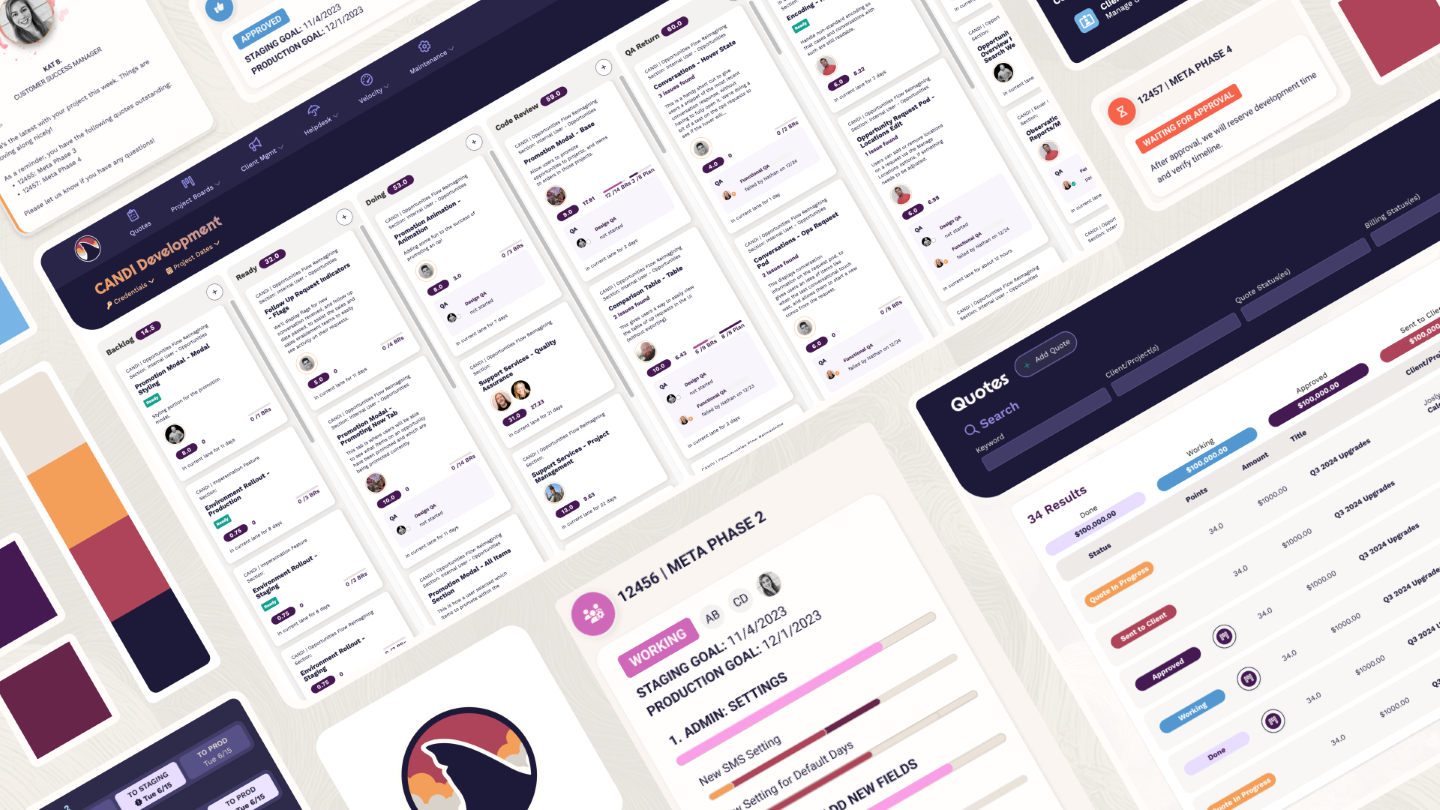
I’ve noticed something over the years: every time we make a major investment in our internal systems, we have a great year the following year. I was thinking about this again last week because 2025 was a heavy internal system investment year, and those are often a little painful at the time. It’s real dollars spent today for a future reward. Sometimes it feels like watching the Lord of the Rings trilogy: you know it’s leading somewhere important, but there are a relentless string of battle scenes and weary marches through the mud before you get there and at some point you just want to fast forward to the end.
That’s what 2025 felt like, and so it’s no surprise that I’m excited for 2026. I can’t wait for our team to reap those hard-won rewards.
This also offers a great opportunity to pull back the curtain a bit on employee portal work: while many of our clients are great about letting us show off our work, we still take that trust very seriously and stay high-level to avoid sharing more than they’re comfortable with. When it’s our stuff, we can get into the nitty-gritty.
A few months ago, I had a conversation with a respected colleague and MIT CISR Research Fellow, Gary Scholten. One of the most interesting topics that came up was the degree to which companies will invest in user experience for employees. Too often, companies wait for their internal UX to be a severe problem before taking action: regulatory fines, major mistakes or breaches, or high turnover. But internal team experience is actually a little-understood unlock for team success. So before we get into the details of our investment in upgrading our employee portal, let’s dive into some background.
Tool Overload Sneaks Up on Workers
One of the biggest factors in employee experience is the digital tools they use, and specifically the quantity of tools team members are expected to use daily. The last 20 years have brought a proliferation of fantastic, cost-effective (and sometimes mediocre or overpriced) SaaS tools for business. There are tools to track time, manage projects, house documentation and stay on top of tasks. There are graphing tools, accounting software, CRMs and ticketing portals. Then there are the tools employees must use when interfacing with other companies, as each business has its own unique collection of tools, so your vendor or customer’s tools are probably not quite the same as your tools, necessitating yet another set of tools.
So what did businesses do? They built intranets with links to all of these tools, and in some cases, single sign-on. This only kind of worked to solve the problem: It eliminated some first-level friction of remembering where to go and how to log in, and in the case of SSO, arguably improved security, but did nothing for the employee experience of trying to stay up-to-date in so many platforms. It didn’t change the need to go to all those platforms, learn all those tools, and navigate between them; it just made getting there a little faster.
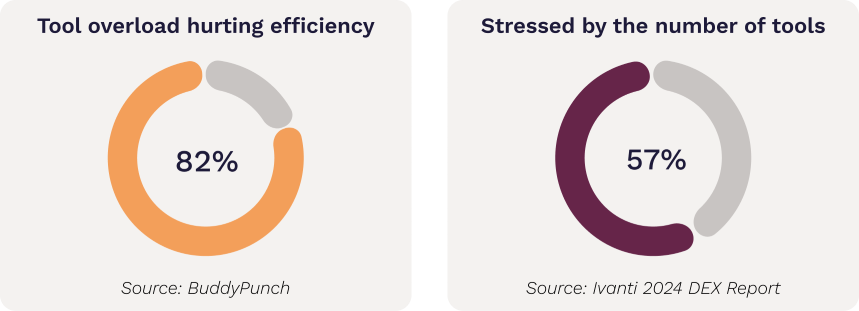
The research shows a clear problem: 82% of employees say tool overload is hurting their productivity, and 57% of workers say they are stressed by the number of tools they must use to complete their work.
This isn’t just perception. A 2022 Harvard Business Review study found that office workers switch between apps, on average, 1200 times per day. This is taxing because you’re asking the brain to adjust to different environments and controls. It’s as if you were playing Mario Kart for 20 seconds and then switched to Tetris for 20 seconds and then to Halo. You probably wouldn’t do very well in any of the games. Each has different controls, objectives and norms. In business applications there’s not an obvious score to point out the flaws of the approach, we just accept it as the norm. But the cost is palpable. In our experience, this can lead to people delaying or working around switching to another tool, unconsciously avoiding that context switching cost.
One Portal to Rule Them All
True integration within a single main portal (deeper than an array of links in an intranet) can partially solve this problem, by reducing the need to actually switch to another application.
For example, our recent revamp of our internal software, Dunk (named for Dunkleosteus, a Devonian-age predator of the seas, thanks to Dev Team Captain Jamie’s love of dinosaurs) allowed us to integrate with our time tracking software, Harvest, so that employees no longer directly needed to use the Harvest interface. This was particularly helpful because there were some nuances about the Harvest setup that led to confusion for our team. Time tracking is one of those things that no one enjoys doing, but it provides extremely valuable data. We want to make the experience as easy as possible for our team so that they do it accurately. When we noticed repeated questions and issues about how to track time, that indicated an opportunity.
But it wasn’t just about the integration. If we had simply integrated but used the old interface, we’d have solved only part of the problem. The other issue was that Harvest, while a great product we’re happy with, is built to serve thousands of companies. It’s a bit generic, and its setup doesn’t exactly match how we work. That means in addition to the physical context switching of a different app with different controls, employees are also using different terminology. For example, we tend to work with the same clients over and over. That means we have a 3-tier system to organize quotes. A Client can have multiple Projects (applications) and a Project can have multiple quotes. Harvest has a two-tier system: a Client can have many Projects. To make this work, we actually map a Harvest Project to our Quote, meaning there’s a terminology switch the user has to make when using Harvest’s interface. It also means that, since we’re using it in a somewhat non-standard way to get the reporting we want, the interface isn’t ideally set up for this use case.
The hidden reason integrating with Harvest’s API in Dunk worked was because it allowed us to control the interface, and adjust it to fit how our team thinks about work. No more questions about what to track where. Now there’s a button on each task card to track time, and that automatically tags it to the right Client, Project, Quote and even task/subtask in our system. Stress gone.
We discovered this by carefully studying the problem, assuming positive intent on the part of our team, and looking for the friction that was stopping smart, well-intentioned people from knowing where to track their time.
And therein lies a fundamental tenet of optimization: if you have the opportunity to eliminate a moment of question in a crucial process, do it. The amount of time people spend pondering, working around or avoiding when they don’t understand something is costly to business—including ours.
When Integration Isn’t Enough
There may come a time on your portal journey when you notice a creepy little guy in a loincloth following you in the shadows murmuring “my precious KPIs…my precious KPIs…” This is a sign that you are on the right track, but need to take it further.
Not every problem can be solved with integration. In some cases, the needs of the business diverge too much from what the purchased solution can do and it can’t be covered up with an API integration, or the interface itself is too big a part of the SaaS product and it doesn’t make sense to reproduce. This indicates that it’s time, difficult though it may be, to throw the purchased solution into the fire and build something custom. In our case, our use of Trello as a project management tool fell into this category.
This is not a criticism of Trello. We’ve happily used the product for years. It’s well-done and easy to use. They continue to invest in it and for the most part, make good choices. But, like Harvest, they have to be all things to all people. Unlike Harvest, the interface is large and complex for end users with minimal tools for reporting. There wouldn’t be much point to using it as a back-end without using the front end. So, in this revamp we created our own kanban boards designed around how we work, and store that information in our own back end.
This is also beneficial because we’re in the midst of obtaining our SOC 2 Type 2 certification. Housing such significant project data within our walls, subject to our security controls, is an important part of ensuring we are in compliance with those standards.
Creating our own back end allowed us to solve some ongoing challenges:
Having role-based ownership instead of generic assignees (for example, the card has an owner, generally the developer responsible for it, but also has other developers who may be assisting, and a separate area to tag owners for up to 4 types of QA: E2E Testing, Functional Testing, Design QA and Dev QA. Not every card has all 4 types, and we can configure based on the needs of the task.
Embedded test plans, with notes on exactly what passed and failed right in the card. We used to do this with Trello comments, but it was messy for complex cards. This keeps everything organized.
Automatic Slack notifications for movement. Trello has notifications, but Slack is our main collaboration tool. In interviewing our team, we found that trying to monitor both sets of notifications created stress and confusion. We automatically pipe all notifications now to Slack, which also means we can control the phrasing, organization, timing and tagging of these notifications.
Everything has an ID. Another challenge in a collaborative team is making sure everyone is talking about the same business rule, card, feature, etc. You don’t want someone in a hurry to have to type out “The rule about the boundary condition when crossing over a calendar year and what happens to unused credits.” That’s exhausting. That’s why we make sure every business rule, mockup, feature, subfeature, and testing issue has a unique identifier. We also make sure the ID system is different among these. Business rules get numbers (1, 2, 3). Mockups get roman numerals (I, II, III). Issues get automatically generated word-pair descriptors which are often accidentally hilarious (a team favorite to date is sultry-radiator). All of this means we have a built-in shorthand to ensure we’re talking about the same thing.
More nuanced security. We now have a way to control security in a more nuanced way that fits our workflow, ensuring people see only what they need to, and also paving the way for us to work with more part-time and specialty resources while maintaining security.
Built-in commendations. These are a way to recognize each other for work well done. A lot of our interaction (design reviews, code reviews, QA testing) is focused around catching & improving what’s not quite right. This gives us a vehicle to share positive feedback as well.
Individually, none of these considerations would be enough to warrant building our own solution. But together, they make a strong case for the value of a custom solution. A little over a month in, I’m happy with the ~150K investment we made in the new development. More importantly, our team was instantly pretty pleased with it, which is the more important barometer. Quotes like “I am obsessed”, “Holy moly” and “This is huge” reinforce the value of the investment. It’s early but so far the data shows about 90% better consistency in time tracking as well.
We went deep on our own project here because we could. But these aren't lessons we learned internally—they come from nearly 20 years of building employee portals for clients. Dunk is just where we got to be our own client for once.
Investing in Employee Experience Enhances Team Vibes
It’s also true that people notice the quality of the products they use every day. You don’t want people to have a lower standard of experience in the apps they use casually outside of work as compared to the tools they’re given to complete their work. It sends the wrong message. While teams will forgive some dust and muck while in the process of remodeling, it has to be temporary and lead somewhere. Asking the team to invest in the company, when the company won’t invest in their tools is a tricky proposition.
On the other hand, being responsive to the team and showing them that their input drives change has helped us create stronger buy-in and engagement within the team. Can we do everything everyone suggests right away? Of course not. That’s not required. Listening and making progress step by step earns trust. We’ve seen this in our clients and we see it in our team as well.
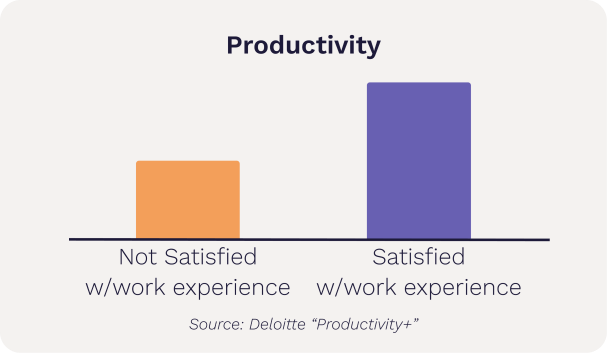
In fact, Deloitte’s 2024-2025 Productivity+ series reports that employees who are satisfied with their work experience are more than twice as productive as those who aren’t.
A Better Employee UX Comes From Experience
It’s also important to note that whether we’re talking about an internal project or the work we do for our clients, integration and building custom are usually not the first step in the journey. There’s cost to integration and custom builds, and that makes more sense when you’ve already vetted the overall process and know what you want. To that end, much of our work in this area is to solve problems that someone’s already attempted to solve in a lower-effort way: maybe through spreadsheets, maybe through off-the-shelf software, perhaps a combination of both. Those efforts aren’t wasted—they build valuable foundational understanding of how the business operates so that integration and custom builds for employee portals are based on clear-eyed assessments.
And if you’re interested in starting or revamping your employee portal, get in touch and request our guide to Elevating the Employee Portal Experience today.